
October 2026 News
Slightly outdated demo of some capabilities.
Not an advertisement/promotion.
What's New
🟢 Notice: Free upgrades continue through the month of October to improve results and performance. Restart your device or force-stop Nuvio and reload it to see a total catalog overhaul with:- Two Top-25 catalogs in 1, 2, 3, etc. order that match movie poster labels- Improved Family & Kids categories- Larger category libraries: more movies and shows in many categories to pick from (sometimes, well into the thousands)- New Adult Animated Shows and Movies categories- Vastly expanded (and daily randomized) "secret" categories- True, daily randomization applied to many other catalogs also, ensuring new discoveries every day- Updated Nuvio Collections row based on all of these changes- Also, Nuvio now displays scores movie and show scores from Trakt, IMDb, TMDB, Letterboxd, Rotten Tomatoes, Metacritic, and MyAnimeList...I had to pay out-of-pocket to make all of that possible. The actual lists comprising some of the categories may be the best in the world. I was quite thorough. No Charge. Donations are up to you.Prior, recent updates: Improved subtitles, backup logic, performance, optimized sources, and backup streams as "🍹 VIP Backup".🟢 Notice: Added instructions for optionally updating ChillHub (the main display on your streaming device that shows all your apps). Switching to the developer's new update method ensures future updates/improvements get installed seamlessly.🟢 Notice: Added instructions for transferring TiviMate recordings to your computer to save space on your streaming device(s).🟢 Notice: For a limited time, root access is available for Fire TV Stick 4K Max (2nd Gen) and/or Fire Cube (3rd Gen). However, I need physical access to your device because it's a low-level process. If having total control over your device interests you, let me know. Your Fire Stick likely has System User access already if I have configured it, but root (total) access is better. Not a promotion or advertisement. No Charge. Donations are up to you.🟢 Notice: you can now update SmartTube to fix playback error messages. Check for an available update by pressing the remote's Left button until you see the left menu > go to Settings > About > and proceed to check for and install updates. You may need to press the update button twice before any available update appears. If prompted, use package installer to install the update.🟢 Notice: TorBox is celebrating a 1 million active account milestone as of September. The number of users (unknown) is much greater than the number of accounts.🟢 Notice: As of September, Nuvio is celebrating its first stable release, aka version 1.0.0, as well as 400k monthly users. Upgrading to v1.0.0 is recommended. As mentioned elsewhere, you can only upgrade the sideloaded version because the Google Play Store is presently not providing Nuvio app updates. Also, you can now select the stable rather than the beta channel, as the beta channel is somewhat experimental.🟡 Notice: 🍹 VIP Backup is temporary. The solution is to purchase your own backup for $12/mo. Let me know if interested. Not an advertisement or promotion.🟢 Notice: TorBox (TB) free has credited three (3) free days worth of use because of the August outages. They have a new policy that credits for downtime. They've also done their best to mitigate future outages.🟡 Notice: in late August, Google increased the price of the Google TV Streamer device from ~$100 to ~$150. This change reflects recent memory chip pricing trends, etc. The solution is to find a coupon or recognize cost savings in other ways.🟢 Notice: Do you have a live TV backup? The TV service merchant recently began selling a new IPTV service. He's not me. He's a different person. You can contact him about it. I can't list IPTV service names here. Prices are probably similar to the existing service you may have. Not a promotion or advertisement.🟡 Notice: Nuvio has been removed from the Play Store. The immediate and simple solution is to bypass Google Play by downloading, installing, and using the sideloaded version available below in Downloads. The sideloaded version has other benefits like easy self-updates and in-app trailers. After the sideloaded version is installed, you can delete the old Nuvio from the Google Play Store.🟢 Notice: TiviMate has returned to the Google Play Store. You should be able to update it again if it was installed from Google Play. Otherwise, you can check for/download updates within TiviMate. Also, the latest TiviMate is listed below in Downloads. I still recommend using the sideloaded (downloaded from here) version. So, here are the steps to sideload (download and install) it:1. Back up: Back up your current TiviMate configuration via Settings > General > Back up data > Download folder > etc.2. Uninstall: After successful backup, uninstall the TiviMate app via hover over TiviMate app > long-press central select button on remote > Uninstall.3. Download and install: Download TiviMate (sideload version), open your file manager app > navigate to the Download folder > and select/install tivimate.apk.4. Restore: Open TiviMate and import your backup file via Settings > General > Restore data > Select local backup > Download folder > etc.5. Grant permissions: hover over TiviMate app > long-press central select button on remote > Info > Permissions (on bottom) > Files: change to Allow, Microphone: change to Allow, "Remove permissions and free up space": toggle off > press the remote's back button until you see a familiar screen.By the way, the sideloaded TiviMate app self-updates and handles file access (such as importing backups, recordings, etc.) better than the Play Store version.If Google removes TiviMate from the Play Store in the future, purchasing TiviMate will require an Android mobile device and the TiviMate Companion app.If you require assistance with any of this, contact me. I cannot update TiviMate remotely, however. For the average user, the latest update isn't that important, anyway.
> Questions? Ask me <
Older & Important Info
NEW: Nuvio — a sleek Stremio alternative; official website: https://nuvio.tv.NEW: Nuvio fixes DV (Dolby Vision) playback issues for Fire Stick 4K Max 2nd Gen devices. Therefore, Nuvio is recommended over Stremio for Fire Sticks. However, Google TV Streamer 4K devices remain superior and are recommended instead — see below.NEW: easy access "collections" row of streaming platforms and custom catalogs (New, Quality, Anime, Kids, and TorBox) — see video. The animated logos look cool — plus — when you pick one, you get a page of content. Select Library (not shown in video), and get adult, rare, etc. content — things otherwise found outside of your TV. Just think of the possibilities! I can tell you how to do add content there. You can self-serve.NEW: rows/catalogs + improvements — more, faster, better.NEW: stream/file playback options — more + better results + refined presentation; e.g., scoring: A+ | A | B | C | etc.NEW: consolidated “pro-grade” addon system....These new features are also available in Stremio, except for the collections row (due to Stremio's limitations).Not a promotion or advertisement.
> Contact Me to Update <
Updating your Stremio/Nuvio requires my temporary access. Feel free to change your password later. Don’t share your password with others.
Services & Equipment
Debrid Service
🟢 Notice: TB (TorBox) is a high-quality replacement for RD (Real-Debrid). RD now has 50%+ less content. See the news. Let RD expire. TB pricing is similar and billing is actually more convenient (simple monthly credit/debit card billing). Also, unlike RD, you can use TB for streaming at multiple households simultaneously! ...Yes, it is better in that way, also! You may use the link above to subscribe to the ~$3/mo TB service. You will need to contact me to get your Stremio or Nuvio reconfigured. Debrid comparison reference. Not a promotion or advertisement.
IPTV Service
🟢 Notice: I know a better IPTV service than Pie (🥧). It's more stable, slightly less expensive, and US-based/faster. I don't sell it. I know a guy who does, though. He takes Cash App for payment and uses Telegram and Discord for communication/support. It's your call. Prices vary. Consider how many TVs/simultaneous connections you need. Contact me for info. Not a promotion or advertisement.
Equipment
RECOMMENDED: Google TV Streamer 4K (~$80-$100), white/porcelain model is recommended (buttons are easier to read), with a 2026 or newer manufacture year. Buy in-person at Best Buy, order from Amazon, or direct from Google. You'll also need an HDMI cable. A certified HDMI 2.1 cable is recommended. Here's a good cable. Avoid cables longer than six feet.
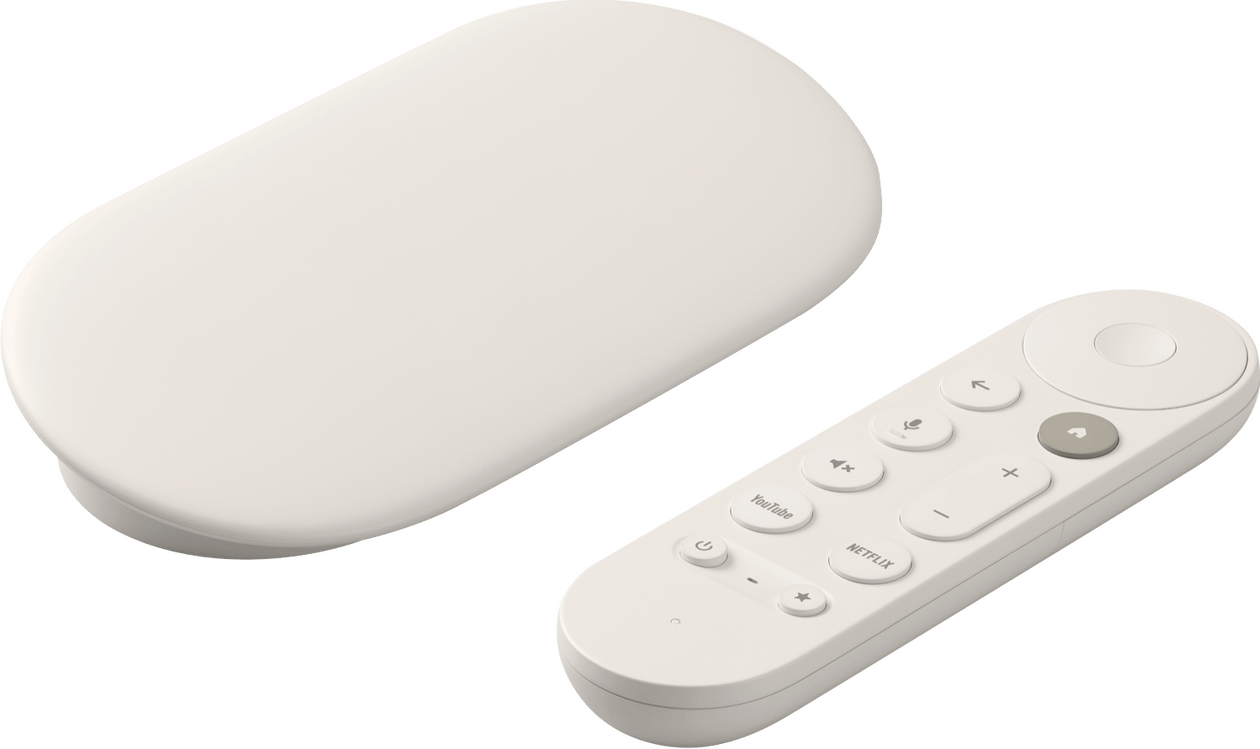
Current Price Estimate$150, Google TV Streamer 4K (see above)**
$10, certified HDMI 2.1 6' cable (see above)
$34, "gold standard" IPTV app aka TiviMate Lifetime (per their website)
$75+/6-mo, IPTV service for 6 months (plans/prices vary)
$3/mo, TB service (per their website; for Nuvio & Stremio)
$20, shipping to you (per USPS)
===
Total: $292 for a fully configured device (debloated/optimized/tweaked/cutting-edge/world-class)Ongoing: < $18/mo for an active IPTV and TB subscription (paid elsewhere)If you do not want live TV, you can subtract $133 from the $292 estimate.**If you want a Fire TV Stick 4K Max (2nd Gen) instead of a Google TV Streamer 4K, you can subtract $90 from the $292 estimate. However, this Fire Stick option is only available for a limited time due to an Amazon update glitch.If you do not want Nuvio or Stremio, you may subtract $3 from the $292 estimate.Additional configured devices are less expensive because you may have already paid for TiviMate, IPTV, and TB.For first-time setup, please create a brand new, free Google Account via your phone and send me the username and password. You can change the password later. This account can also be used with a TB subscription.You can ship the Google TV Streamer 4K to my address. Be sure to tell me your address for shipping the completed device.
> Contact Me to Get Started <
I do not charge for device configuration and do not make a cent. Each device takes hours to configure, mostly by hand. Any money I receive is unaffiliated/donation-based.Fire TV Stick 4K Max (2nd Gen) customization is no longer available due to limited retail inventory of customizable models. Onn devices are not recommended, as they have unreliable WiFi, problematic system updates, and other issues. Google TV Streamer 4K devices perform faster, offer better picture quality, and are easier to use.
Downloads
Google TV Streamer devices: update an app by "hovering" on the app → long-press your remote's center selection button → Play Store → select Update (only appears when an update is available). Some apps update more often than others (i.e., Nuvio and Ultimate File Manager Pro). Most apps can be found/updated this way. Therefore, the app list below is mainly for reference. Apps below marked with ⬇️ are to be downloaded/updated via the Play Store, but can be downloaded via this page if necessary. Those marked with ⤵️ are to be downloaded/sideloaded from this page exclusively because Google Play does not offer them. For example, SmartTube must be sideloaded because it is not available in the Play Store. Never update “Gboard”, "Speech Recognition & Synthesis", “Google app for Android TV”, “DfuService”, or “Android TV Remote Service.” You may update “Android System Webview.”Fire Stick 4K Max 2nd Gen devices: update apps using APKUpdater via Home → ⚙️ icon → All apps → APKUpdater. If an app cannot be updated, use the download link below. To install an app from below, download the app to your device → Home → ⚙️ icon → All apps → Fluffy or Cx File Explorer → Downloads → tap file → Install. Can't download? Open TV Bro → back button on remote → press right button on remote until you get to the ⚙️ icon → ⚙️ icon → Web browser engine → change to GeckoView → try downloading again. Alternatively, try downloading via the browser built into the Downloader app (available on Amazon's App Store).Not included on this page: my custom TiviMate backup file (with organized categories and channel lineup), my unique device configuration scripts/processes, and my Amazon debloat/anti-spyware package list/definition text file for my Cloak and Restore apps for use with Fire Stick 4K Max 2nd Gen.The following downloads are provided for convenience and use official versions.
::: All Devices :::
⤵️ TiviMate
Live TV streaming app; sideloaded version is superior with latest in-app updates and file access⤵️ Nuvio
Streaming app; sideloaded version is superior with latest in-app updates, Netflix-style trailers, plugin capability, etc.⤵️ Stremio
Streaming app; sideloaded version is superior⤵️ SmartTube
Ad-free YouTube app⤵️ ChillHub
Launcher app; see the upgrade steps (for technical users).⬇️ TV Bro
Web browser app⬇️ Sofascore
Sports scores app; streamlined version⬇️ Aerial Views
Screensaver app⤵️ MiXplorer
File manager app; download the bottom-most version ending in ".apk"⬇️ tvQuickActions
Button remapper app⤵️ PrivadoVPN
Possibly the fastest VPN available. Requires a $20/yr subscription. Useful for travelers (e.g., stream in your hotel room) and may resolve some TiviMate errors. In settings, select the best connection by latency, use WireGuard, and change the theme to dark or purple. For Fire Stick, sideload only if Amazon account will change (most likely will) after device provisioning; otherwise, use Appstore version.
::: Fire Stick Only :::
⤵️ Prime Video v321
Optional streaming app⤵️ DirecTV v5.0.114
Optional live TV streaming app⤵️ APKUpdater
Updater app⤵️ Launcher Manager v2.0.0
System app⤵️ Cloak (Root) v2.5
Optimization app; only for rooted Amazon devices⤵️ Restore (Root) v2.5
Restoration app; only for rooted Amazon devices⤵️ Cloak v1.1
Optimization app; only for System User Amazon devices⤵️ Restore v1.1
Restoration app; only for System User Amazon devices⤵️ Installer v11
System installer app➡️ Other Fire TV
Other apps
::: Phone / Tablet / Desktop :::
➡️ ADB Utility
Command your TV device using this free iPhone/iPad app. After installing, click the refresh button > wait a couple min. while it finds devices on your network. To fix Nuvio self-update, first select your TV device in ADB Utility > Shell > then paste this command: appops set com.nuvio.tv REQUEST_INSTALL_PACKAGES allow > Send > Go back to Nuvio > try updating again.➡️ Cromite
Windows and Android private browser➡️ TorBox Manager
Manage TorBox content➡️ Magnetar
Add website-sourced content to TorBox library easily | alternative➡️ TorBox Tools
More content sources if necessary➡️ Content Tracker List
Track available content➡️ Content Tracker (A)
Track available content➡️ Content Tracker (B)
Track available content➡️ Anime Content Tracker List
Track available anime content➡️ Adult Content Addon
Get adult content
ChillHub Launcher Update
How to Update ChillHub
ChillHub is the main display on your TV that shows all your apps.An update is available, but it is not mandatory. Staying on v1.2.3 is completely fine if you're happy with how it currently works. If you want the latest features (faster startup, better app reordering, and background auto-updating), you can update.How to check your current version:
Use your remote to navigate to the top row of the home screen. You will see three icons in the corner. Select the left-most icon (the sliders/preferences icon, next to the gear and Wi-Fi icons). On the left side of the screen that opens, you will see ChillHub with the version number displayed directly beneath it (e.g., Version 1.2.3 or Version 1.3.3).One heads-up: Because this moves to the developer's direct version, you must uninstall the old version first. This resets your wallpaper and app order inside ChillHub, but none of your installed apps are deleted or affected. You can reorganize your apps once installed.Upgrade Steps:1. Install a temporary fallback launcher:
Install AT4K from the Google Play Store (or download the APK directly using your TV browser, such as TV Bro). This gives your TV a temporary home screen so it doesn't get stuck without one during the swap.2. Uninstall your current ChillHub:
Open AT4K, highlight ChillHub, long-press the remote's center button, select App Info, and choose Uninstall.
(If using ADB: adb uninstall app.lumoslabs.chillhub)3. Download the new ChillHub:
Open your TV browser (such as TV Bro) and download the APK via this link or use this backup GitHub link. The downloaded file will be named chillhub.apk.4. Install the file:
Open your file manager (like MiXplorer or Cx File Explorer), navigate to your Downloads folder, select chillhub.apk, and install it.
(If using ADB: adb install chillhub.apk)5. Set ChillHub as default & remove AT4K:
Press the Home button on your remote. If prompted to choose a home app, select ChillHub and choose Always. Open ChillHub, find AT4K, long-press it, and select Uninstall.6. Finish setup:
Open ChillHub Settings (the sliders icon) to reapply your preferred wallpaper, set the clock, and rearrange your apps. Future updates will download automatically in the background.
TiviMate Recordings
How to Transfer TiviMate Recordings to Your Computer for Long-Term Storage
Streaming devices like Google TV Streamers and Fire Sticks have very limited internal storage. Use this guide to easily offload large TiviMate recordings directly to your laptop or PC over your home Wi-Fi—no cables or flash drives needed.Requirements
• MiXplorer installed on your streaming device
• A computer (PC, Mac, or laptop) connected to the same Wi-Fi networkStep 1: Start the Server on Your TV
1. Open MiXplorer on your streaming device using your remote.
2. Navigate to the three vertical dots in the top-right menu.
3. Select Servers > Start HTTP/WebDAV Server.
4. Take note of the IP address shown on screen (e.g., http://192.168.1.50:8001).Step 2: Connect from Your Computer
1. Open any web browser (Chrome, Safari, Edge, Firefox) on your computer.
2. Type the streaming device's exact address into the address bar (including http:// and :8001) and press Enter.
3. Your streaming device’s internal storage files will appear directly in your computer browser.Step 3: Download Your Recordings
1. Click into the folder path: Download > TiviMate > Recordings.
2. Click on any video file (usually .ts or .mp4) to download it straight to your computer's Downloads folder.Step 4: Free Up TV Storage & Shut Down
1. Once your recording finishes downloading and plays properly on your PC, you can safely delete it from your TV (either inside TiviMate or MiXplorer) to reclaim device storage.
2. In MiXplorer on your TV, go back to the top-right menu and select Servers > Stop Server when you are finished.